Drop a source
Drag a video or a folder onto the drop zone, or press Ctrl/Cmd + O. The queue shows duration and copy count per source.
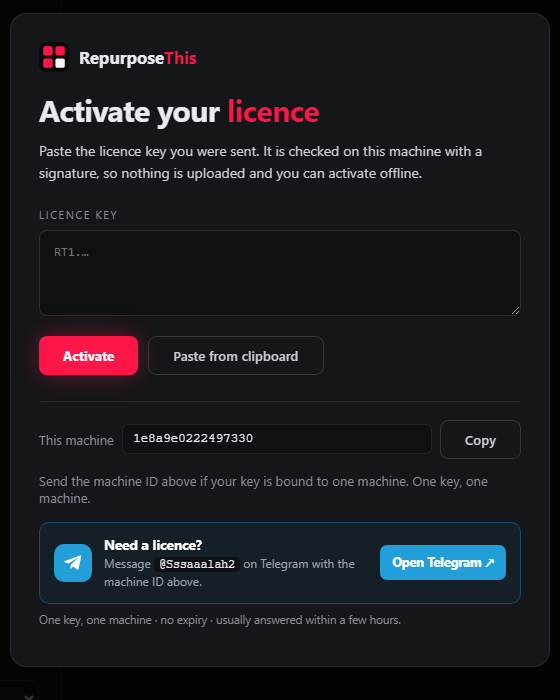
The installer is the full application — there is no separate “pro” download. It opens on an activation screen until you paste a licence key.
Self-contained setup. Includes the video pipeline, image pipeline, ffmpeg, and the licence screen. No runtime to install first. Hosted on GitHub Releases — no account needed to download.
Download for Windows ↓Windows SmartScreen may warn that the installer is uncommon. The build is not code-signed with an EV certificate; the SHA-256 above is the checksum of the file served here. 2.0.1 adds the Telegram contact and licence panel to the activation screen.
Keys are issued by hand on Telegram, because the licence is bound to your machine rather than an account. Install first, then send us the machine ID from the activation screen.
Run the setup file. Launch RepurposeThis from the Start menu. The activation screen shows your machine ID.
Send the machine ID and say which platform you are on. We reply with payment options and the price ($25, one machine).
Paste the whole RT1… key into the app and press Activate. Verification is offline.
Already bought? Paste the key you were sent. Lost it? Send your machine ID again and we will look it up in the ledger.
The app opens on the Video Repositor with a preset loaded. These are the only decisions you have to make.
Drag a video or a folder onto the drop zone, or press Ctrl/Cmd + O. The queue shows duration and copy count per source.
Start with a built-in preset that matches the platform. Every value inside it is a range, and every copy samples that range separately.
Set copies per source, press Run. The batch ends with a uniqueness report and optional contact sheets.
The same codebase builds for macOS 11+ (Apple silicon and Intel) and Linux (x64, arm64). Builds are produced on request rather than hosted as a permanent download.
Message us with your OS and architecture and we will send the right package along with the key.
Request a build ↗Settings, presets and history live in your user data folder, so a newer installer keeps them. The old duplyfi-data folder is renamed in place on first launch so a library survives the upgrade.
Send us your machine ID on Telegram. We will take it from there.